Weather Live Wallpapers
- 4.5
- Rating
- 1.00M
- Installs
- Free
- Price

 Analysis by App-foxy
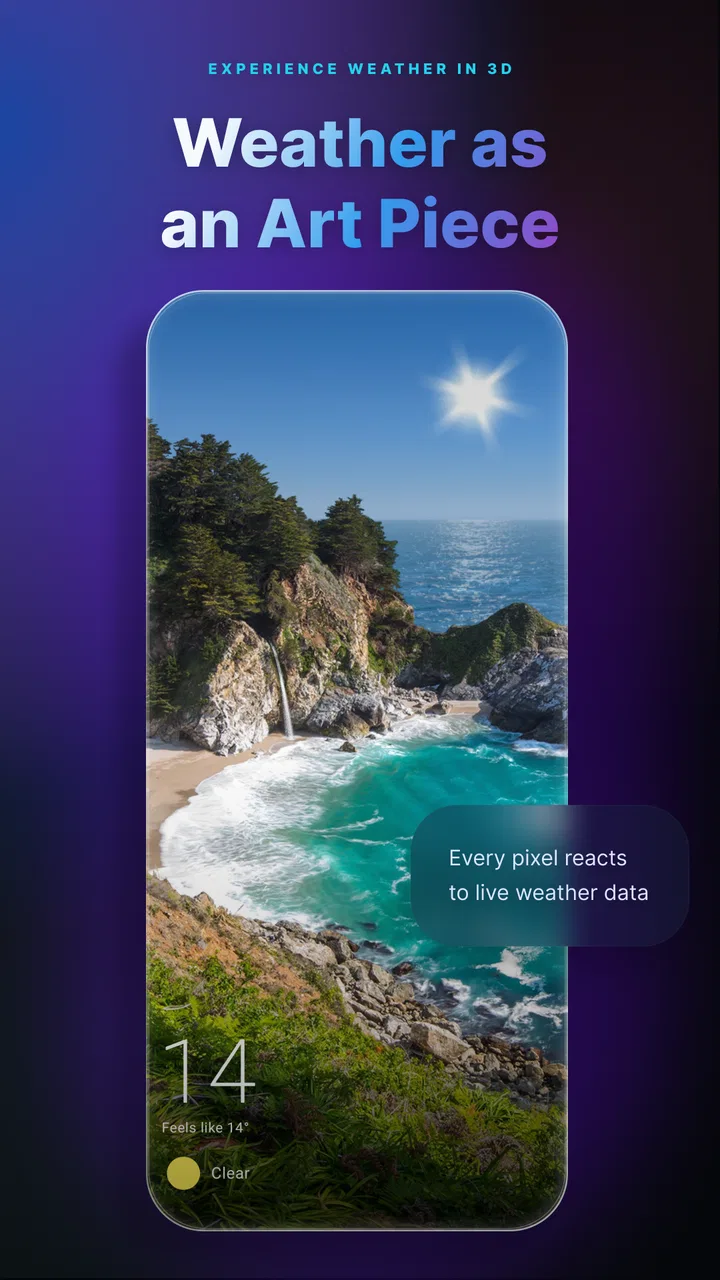
Weather Live Wallpapers is the kind of weather app I notice most when I stop looking at it. Instead of opening a forecast screen every few hours, I can glance at my phone’s background and get a visual sense of the conditions outside. Rain, snow, and seasonal changes become part of the wallpaper rather than another notification demanding attention. That makes the app feel more like a quiet environmental layer than a traditional forecast tool.
After spending time with it, I see the strongest appeal in the combination of atmosphere and convenience. The app is free to start, rated for Everyone, and developed by SkySkyAm. It has reached over a million installs and holds a 4.6 average from around 24 thousand ratings, which fits my impression: this is aimed at people who want weather to feel present on their phone, not people searching for a professional meteorological dashboard.
The important distinction is that the app’s main value is visual. I would use it alongside a normal forecast service when I need exact planning information, but I would choose it when I want my home screen to reflect the day outside. That difference matters, especially when deciding whether a live wallpaper is worth the extra activity compared with a standard weather widget.
You May Also Like

 Blood Strike: 2.5 Anniversary
Blood Strike’s Loadouts Turn Every Drop Into a Tactical Gamble
A close look at Blood Strike’s custom loadouts: how fast access to signature weapons reshapes its battle royale rhythm, rewards preparation, and narrows the gap between fights.

 Pandora - Music & Podcasts
Pandora’s Music Is Easy to Start, but Harder to Recover
Pandora’s strength is its low-effort path from a seed to a station. Its weak spot is how much confidence it asks you to place in connection, setup, and quiet recovery.

 8 Ball Pool
 Is Built on Rivalries, Rematches, and Routine
A close look at the rivalries, rematches, shared routines, and unanswered safety questions that turn a quick pool match into a persistent mobile community.

 Samsung Music
’s Quiet Strength Is Playing What You Already Own
Its reach comes less from spectacle than from dependable access to a personal library. That simplicity is both the app’s strongest retention engine and its ceiling.

 AccuWeather: Weather Radar
AccuWeather Review: A Quick, Clear Forecast for Everyday Decisions
For everyday plans, the best forecast is the one you can understand quickly. AccuWeather makes rain timing, radar, and local conditions easy to act on, with a few trade-offs.

 Hill Climb Racing
Why Hill Climb Racing Still Turns Crashes Into One More Run
A tiny car, a bumpy hill and one more upgrade: Hill Climb Racing keeps resurfacing because its simple chaos makes every near-miss feel personal.
More From Our News Desk



How the wallpaper changes the way I check the weather
I find this wallpaper most useful when I treat it as the first step in a weather check, not the whole answer. A glance can prompt me to look outside or open a forecast before I head out, which is a practical handoff from visual cue to informed decision. The next section looks at how I make that transition without letting a decorative background stand in for details I need.
Weather information that works in the background
The most enjoyable part of the experience is the passive glance. A conventional weather app asks me to open it, wait for the current conditions, interpret symbols, and then close it. A live wallpaper removes most of that routine. When the background shows a rainy scene, falling snow, or a seasonal change, I receive a quick visual cue before I have even decided to check the forecast.
That is particularly useful during ordinary moments: getting ready for work, checking the time before leaving home, or picking up the phone while waiting for a message. I do not need a detailed hourly chart every time. Sometimes I only want a reminder that the day feels wintry or wet, and the animated background provides that reminder without taking over the screen.
There is also a pleasant emotional difference between a wallpaper that reflects the weather and a static image that looks identical all week. The changing scene gives the phone a sense of time and place. I found myself noticing seasonal transitions more than I expected, because the background made them visible during routine phone use.
Where connectivity becomes part of the experience
A weather wallpaper is naturally tied to changing conditions, so connectivity shapes how trustworthy the visual update feels. When the app can refresh the weather context, the background feels connected to the day outside. When a connection is weak or unavailable, I treat the display more cautiously: it remains useful as an animated scene, but I do not assume that every visual change represents the latest local condition.
This is an important difference from a purely decorative wallpaper. A photograph does not create an expectation of current information. Weather Live Wallpapers does, so network-dependent moments are more noticeable. If I am indoors with poor reception, travelling through areas with unreliable service, or switching between networks, I would not use the wallpaper alone to decide whether to carry an umbrella or plan an outdoor activity.
My practical approach is simple: I enjoy the live background for quick awareness, then open a dedicated forecast app when the decision has consequences. That combination avoids asking the wallpaper to do a job it is not designed to replace. It also keeps the experience relaxed instead of making me repeatedly question whether the scene has refreshed.
A better fit for small, repeated checks
The app works best when I look at my phone many times throughout the day. Each glance is short, but the accumulated effect is useful. I can notice a change in the visual mood without interrupting a task or navigating through menus. This makes it more practical for people who want environmental context rather than a long forecast session.
It is less compelling if I rarely see the home screen, use a very busy launcher, or prefer a minimal static background. The live effect needs to be visible to justify its place. If notifications, icons, widgets, and other elements cover most of the wallpaper, the weather animation may become a small detail rather than a meaningful part of the interface.
Using it during a normal day
Imagine I am leaving home for a short commute. I unlock the phone to check a calendar reminder and notice a wet, changing background. That is enough to prompt a quick look outside and a decision about clothing. Later, if I need to know whether rain will continue during the return trip, I switch to a full forecast tool. In that scenario, the wallpaper succeeds because it starts the thought process without pretending to answer every question.
For parents, students, and commuters, that low-effort prompt can be genuinely handy. It may encourage a weather check at the right moment, especially when the visual scene contrasts with what I expected from the morning. For photographers, hikers, or anyone planning around precise conditions, it is better treated as a companion display than as the main source of information.
What changes on a mobile device
Live wallpapers are more sensitive to the way a phone is used than ordinary weather widgets. A person who keeps the phone on a charger at home may enjoy the animation continuously. Someone who spends the day conserving battery, using a power-saving mode, or keeping the screen off will experience the feature differently. The benefit appears mainly during visible home-screen moments, while the cost of having a more active background is a consideration for mobile users.
I would install it first on the device where I actually want the atmosphere. A large-screen phone can make rain, snow, and seasonal transitions easier to appreciate, while a smaller display may make the effect feel subtler. I would also avoid judging it during a single glance. The point is not one dramatic animation; it is the repeated, changing presence across normal use.
For people who use custom launchers or frequently replace wallpapers, setup may require a little patience. The app’s appeal depends on the live wallpaper being visible and comfortable behind icons. If the scene makes text harder to read or clashes with a carefully arranged home screen, the visual benefit can turn into friction. In that case, a compact weather widget may be the cleaner choice.
Rain, snow, and seasons as different kinds of information
Rain and snow are immediately readable because their motion has a familiar meaning. Seasonal changes are more gradual and decorative, so I experience them differently. The precipitation effects give me a quick environmental cue, while seasonal presentation adds personality to the phone. The two roles work together, but I would not confuse an attractive seasonal scene with a precise forecast detail.
This distinction is one of the app’s more interesting trade-offs. The more atmospheric the wallpaper becomes, the more I enjoy looking at it, but the less I should treat it like a data-rich forecast screen. I appreciate it most when I let it provide context rather than demanding exact figures, timing, or planning guidance from it.
When a refresh does not feel immediate
Connectivity problems are most frustrating when I expect the wallpaper to react quickly to a change outside. If I move from a strong connection to a weak one, or reopen the phone after a long period of inactivity, the scene may not feel as immediate as a manually opened forecast. Rather than repeatedly restarting the app, I would first give the phone a moment to reconnect and then verify important conditions elsewhere.
This is also where the difference between visual continuity and current information matters. The wallpaper can remain attractive even when the latest weather context is not at the front of my mind. I enjoy the animation, but I keep my expectations realistic: a live-looking background is not automatically the same as a live, continuously verified forecast.
Recovering without making the problem worse
My preferred recovery routine is deliberately modest. I check whether the phone has a working connection, return to the home screen, and give the wallpaper a chance to settle. If I need an immediate answer, I open another weather source rather than turning a small refresh delay into a long troubleshooting session. This keeps the app in its proper role and avoids wasting time when the decision is urgent.
If the wallpaper looks wrong after changing devices, launchers, or home-screen settings, I would review the wallpaper selection and visibility before blaming the weather content. Live wallpapers can appear to be missing simply because another background has been selected or the launcher is displaying a different screen. A quick visual check of the home-screen setup is more useful than assuming the app itself has failed.
Version 2.40.0 is the current version I would look for when installing, and the app requires an operating system version of 9 or later. That requirement is worth checking before downloading, particularly on an older spare phone. On a compatible device, I would still judge the result by how clearly the animation appears and how comfortably the phone behaves during everyday use, not just by whether installation succeeds.
Being careful with mobile data
Because the experience depends on changing weather context, I would be more comfortable using it on a reliable home or office connection during initial setup and ordinary refreshes. If I am travelling with limited mobile data, I would avoid repeatedly opening and closing the app just to force a visual change. A wallpaper should reduce checking, not encourage constant manual refreshing.
This is one of the less obvious ways to get more from it: let the background be a glance-based prompt. If a scene catches my attention, I can then decide whether the situation matters enough to open a detailed forecast. That two-step habit is more data-conscious than treating every home-screen visit as a request for a full weather update.
I would also consider how often I change locations. Someone who stays in one area may find the wallpaper naturally coherent throughout the day. Someone moving between cities or travelling internationally may need to verify that the displayed context matches the place they actually care about. For travel planning, I would always use a location-aware forecast directly before making a decision.
Free access and the question of upgrades
The app is free, which makes it easy to test without committing money first. There are in-app purchases ranging from $1.99 to $16.99 per item. I would approach those purchases as optional enhancements to a visual experience rather than as a reason to install the app. The free starting point is enough to decide whether the wallpaper fits my phone, habits, and tolerance for animated backgrounds.
My advice is to live with the basic experience through several different kinds of weather before considering an upgrade. If I only like the idea of a live wallpaper but rarely notice it in practice, paying for more would not solve that mismatch. If I enjoy seeing the background throughout the day and want to make the experience more personal, an optional purchase may feel more reasonable.
The trade-off is particularly clear for people who prefer a completely static phone. They may find no value in spending money on additional visual content when a normal wallpaper already does the job. On the other hand, someone who treats the home screen as part of the phone’s atmosphere may see the changing weather as more meaningful than another decorative image.
How it compares with ordinary weather tools
A standard weather app wins whenever I need precision, planning, maps, extended forecasts, warnings, or a dense collection of details. A weather widget is usually better when I want a compact number or symbol that remains readable beside my icons. Weather Live Wallpapers takes a different route: it turns the background itself into the interface.
That makes the comparison less about which app has more information and more about how I want to receive information. The wallpaper is quieter and more immersive than a widget, but it is also less explicit. I can interpret rain or snow at a glance, yet I cannot expect the same clarity as a dedicated forecast panel. For me, the best arrangement is not replacement but division of labor: the wallpaper handles ambient awareness, while a conventional weather app handles decisions.
It also differs from a static seasonal wallpaper in a meaningful way. Static images offer complete control over appearance and generally ask nothing from the user after selection. This app offers change and relevance, but that relevance brings dependence on a functioning update path and a willingness to accept a less predictable background. The choice comes down to whether current atmosphere matters more than visual consistency.
Who will appreciate it most
I would recommend it to people who enjoy seeing weather reflected in their phone’s design, check their home screen frequently, and prefer a visual cue over another row of numbers. It is especially appealing if rain, snow, and seasonal mood make the phone feel more personal. The Everyone age rating also makes it suitable as a broadly accessible weather-themed app, though individual preferences about animation and screen simplicity still matter.
I would be more cautious recommending it to someone with strict battery habits, a crowded launcher, limited connectivity, or a need for exact forecast information. It is also not my first choice for safety-critical planning, outdoor work, travel timing, or any situation where a delayed or ambiguous visual impression could lead to a poor decision. In those cases, I would open a dedicated forecast source directly.
My final view on staying connected
Weather Live Wallpapers succeeds because it makes weather part of the phone’s surroundings instead of another task on a to-do list. I like the way it turns brief home-screen visits into small environmental checks, and I think the rain, snow, and seasonal presentation give it a personality that ordinary widgets often lack. The experience feels most natural when I accept it as ambient information with decorative value.
Connectivity is the boundary I keep in mind. When updates align with what is happening outside, the wallpaper feels wonderfully effortless. When the network is unreliable or I need precise details, I switch to a conventional forecast rather than relying on the animation alone. That habit lets me enjoy the app without overstating what a live background can tell me.
SkySkyAm has made a focused weather app rather than an all-purpose forecasting suite. Its free entry point, broad age rating, and established user base make it easy to try, while version 2.40.0 supports current devices running operating system version 9 or later. My recommendation is simple: choose it if you want weather to quietly shape your home screen, not if you want your wallpaper to replace a complete forecast service.
For my own use, Weather Live Wallpapers works best as a companion. I glance at it for atmosphere and a quick prompt, then use a full weather tool when timing, location, or accuracy matters. That balance is where the app feels most useful, most honest, and least frustrating.
FAQs for Weather Live Wallpapers
01What are the main features of Weather Live Wallpapers?
Weather Live Wallpapers offers dynamic backgrounds that change based on real-time weather conditions. Users can enjoy a variety of scenes depicting sunny, rainy, snowy, or stormy weather. The app also provides customizable widgets with detailed weather forecasts, temperature displays, and the ability to set specific locations for weather updates.
02Does Weather Live Wallpapers consume a lot of battery?
While dynamic wallpapers can be more demanding on battery life than static images, Weather Live Wallpapers is optimized to minimize battery consumption. The app uses efficient algorithms to update weather data and animations only when necessary, ensuring that it doesn't significantly drain your device's battery.
03Is Weather Live Wallpapers available for both Android and iOS?
Yes, Weather Live Wallpapers is available for download on both Android and iOS platforms. Users can find the app on the Google Play Store for Android devices and the Apple App Store for iOS devices. Each version is tailored to take advantage of the specific features of the respective operating systems.
04Can I use Weather Live Wallpapers without internet access?
To display accurate and up-to-date weather conditions, Weather Live Wallpapers requires an internet connection to fetch data. However, once the data is downloaded, the app can display existing weather conditions without immediate internet access, allowing for brief offline usage.
05Are there in-app purchases or ads in Weather Live Wallpapers?
Weather Live Wallpapers offers a free version that includes ads. To enhance the user experience, the app provides in-app purchases to remove ads and unlock additional features, such as premium wallpapers and advanced customization options. This ensures a more personalized and ad-free experience for users who prefer it.
Pros
- Interactive and dynamic wallpapers.
- Updates in real-time with weather.
- User-friendly interface design.
- Customizable weather parameters.
- Low battery consumption.
Cons
- Limited free features without upgrade.
- Occasional lag on older devices.
- Ads can be intrusive at times.
- High data usage if unchecked.
- Some features need internet access.

Weather Live Wallpapers
Gallery